
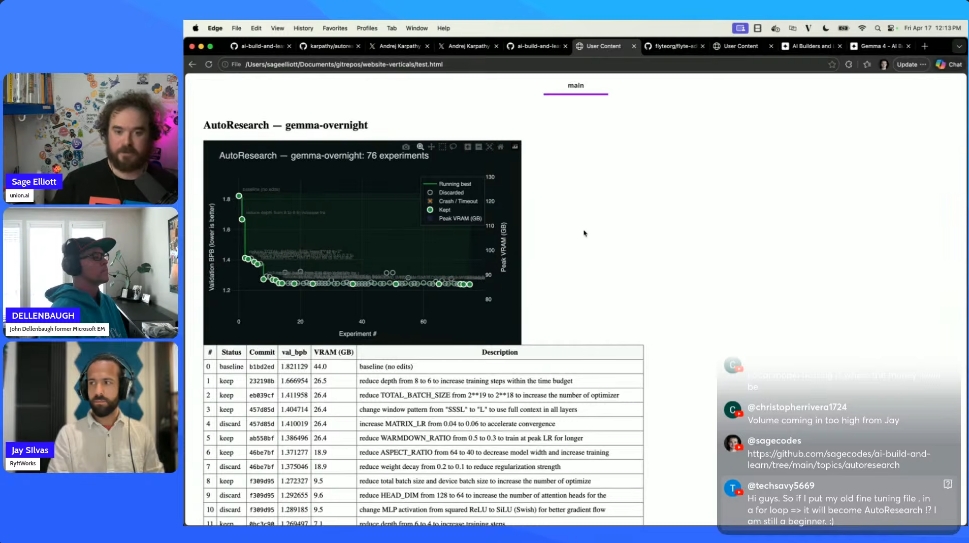
Karpathy’s auto research landed with a lot of hype, so this week’s Build and Learn stream picked it as the topic. Three of us ran variations of the setup on different hardware, compared notes, and tried to figure out what the idea actually is once you strip away the framing.
Short version: it’s an LLM in a loop with unusually good constraints. That turns out to matter more than it sounds.
What auto research actually does
The default setup is minimal. You give an agent a single train.py file, a five-minute training budget, and a validation metric (bits per byte on a small pretraining run). The agent proposes a change, runs training, checks the metric, and either keeps or discards the change. A program.md file holds the instructions and a running log of what’s been tried.
That’s it. No multi-file editing, no tool sprawl, no ambiguous success criteria. One file, one budget, one number that goes up or down.
  ┌──────────┐    ┌───────────┐    ┌──────────┐
  │  Agent   │───>│ train.py  │───>│ Train    │
  │ proposes │    │  edited   │    │ 5 min    │
  │ a change │    │           │    │ budget   │
  └──────────┘    └───────────┘    └────┬─────┘
       ^                                │
       │          ┌──────────────┐      │
       │          │  val_bpb     │      │
       └──────────│  improved?   │<─────┘
                  │              │
                  │  yes: keep   │
                  │  no: revert  │
                  └──────────────┘

            repeat until stopped
Three setups, three sets of tradeoffs
Local on a DGX Spark with Gemma 4. I swapped Claude for a local Gemma 4 served through Ollama so I could leave it running overnight without burning API tokens. Wrapped the loop in a Flyte workflow so each iteration rendered in the TUI and the final report got generated automatically. Ran 70+ iterations overnight, with the metric trending down through batch size and learning rate changes.
One thing worth calling out: smaller open models need more scaffolding in the prompt than Claude Code does. Claude’s harness is doing a lot of work around planning and self-correction. With Gemma, I had to nudge it toward specific parameter categories to get interesting experimentation. Without that, it tended to stay in narrow neighborhoods of the search space.
Cloud T4 with Claude. John ran his version on a GCP T4, with results piped to Firestore and reports rendered from there. The painful detail: he couldn’t get a T4 in the US and ended up provisioning one in the Middle East. Capacity crunch is real. Cost came out to roughly nine dollars a day.
Mac with RL instead of LLM training. Jay adapted the loop to an RL setup, training a bipedal humanoid in MuJoCo. This exposed a limitation that’s easy to miss on the default LLM task: the reward metric is doing enormous work. When your metric is “BPB went down,” the loop converges. When your metric is a composite of “stayed upright” and “moved forward” and “used reasonable actuation,” you have to design that metric carefully or the agent finds weird local optima (a robot that flails and faceplants efficiently, for example).
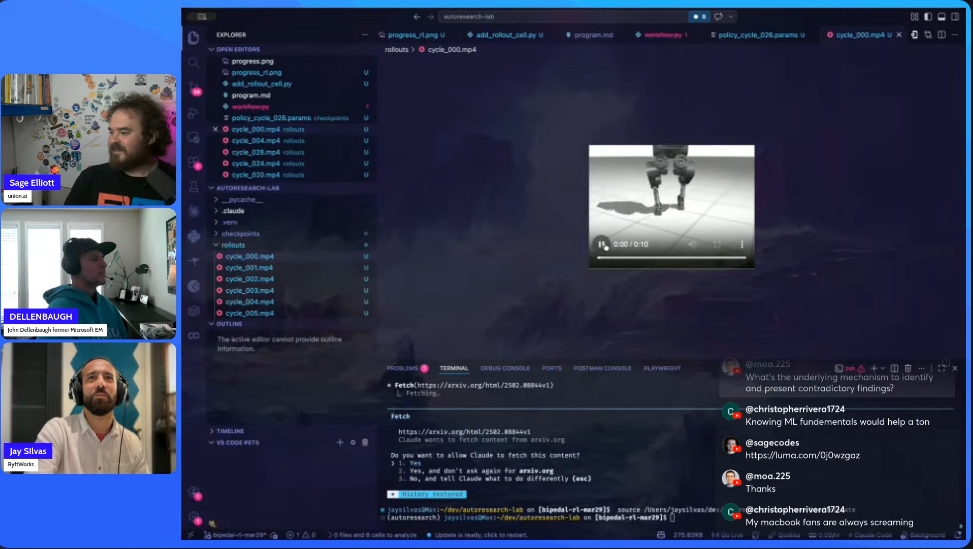
Jay also hit a subtle issue running locally on a MacBook: thermal throttling during overnight runs changes the effective hardware mid-experiment, which corrupts the feedback signal. Dropping the machine to low-power mode fixed it by keeping performance consistent.
Why the narrow scope is the whole point
The most useful takeaway from running this: auto research works because it’s constrained, not because the agent is clever.
One file to edit. One metric to optimize. A short enough budget that bad ideas die fast. A history file the agent reads each iteration so it doesn’t repeat itself. These constraints are what turn “LLM in a loop” from a directionless agent into something that produces a monotonically improving chart.
When Jay opened up the scope to let the model change architecture more freely, it started waffling. Regressions, reversals, circling back to ideas it had already discarded. The narrow version stays productive because the agent can’t wander.
That’s a useful mental model for agent design generally. If you’re building a long-running loop and it’s producing mush, the fix is usually more constraints, not a better model.
Ideas worth considering
A few patterns came out of the conversation that seem worth trying:
Tiered models. Run a small, cheap model for most iterations. Bring in a larger model every N cycles to review progress and set direction. Cheaper than running Claude overnight, smarter than running Gemma alone.
Better discard notes. The default history keeps short summaries of what was kept or discarded, but a lot of context gets lost. Writing atomic notes that survive across iterations (with periodic compaction) gives the agent more to reason over without blowing up the context window.
Curriculum learning for the RL reward. For the RL case especially, start with a simpler reward (stand upright), let the loop converge on that, then layer in the next reward (take a step). This is a known RL technique, but pairing it with auto research’s iteration structure is a nice fit.
Parallel experiments. The default loop is serial. If you can fit multiple runs on one GPU, or you have more than one, fanning out proposals and picking the best per round could compress the wall-clock time significantly. I want to try this next with Flyte’s map_task.
Practical notes if you want to try it
- Five minutes is tuned for an H100. On a T4 or a Mac, you’ll probably need ten minutes or more per cycle for training to actually produce signal.
- On Blackwell hardware, Claude Code initially insisted CUDA 13 didn’t exist. It eventually figured out the right PyTorch install on its own, which was a nice surprise. Worth watching for on cutting-edge setups.
- If you’re using a local model, give the prompt a bit more scaffolding about what kinds of changes to try. Don’t hand it the full search space blind.
- Leaving any looped process running on a cloud VM costs money. Set a hard budget or use local hardware if you can.
Where this goes
Karpathy’s own framing is that auto research will help scale up research at major labs. That’s plausible for the narrow case it’s designed for. The more interesting near-term use, I think, is smaller: personal projects you don’t have time to iterate on, overnight runs that give you a starting point to dig into on the weekend, or domain-specific optimization loops where the metric is clear and the search space is bounded.
The loop itself is not new. What’s new is that the packaging is clean enough that you can actually get started in an afternoon, and the constraints are well-chosen enough that the results don’t devolve into slop.