
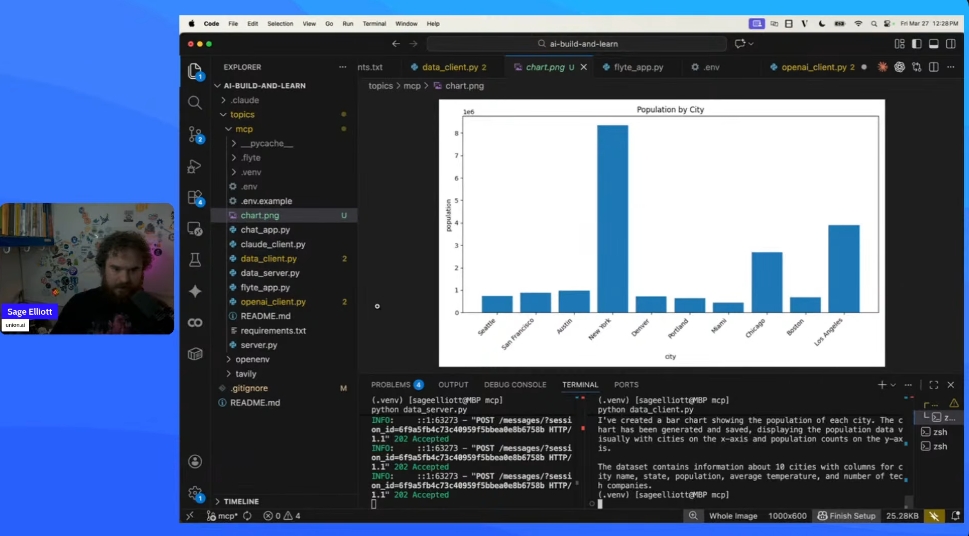
This was the first session in a weekly AI build & Learn” series. The premise: pick a new tool or topic each week, build something small with it, then talk through what worked. Low structure, code-first, one hour of build time minimum throughout the week. This week’s topic was MCP, built with fast-mcp.
If you’ve never built an MCP server, the protocol sounds more involved than it is. The interesting engineering decision isn’t “how do I build an MCP server,” that’s the 20-minute part. It’s “what tools should this server expose, and at what level of specialization.”
What fast-mcp actually gives you
A @mcp.tool decorator, a server that runs on HTTP or stdio, and automatic schema generation from your Python function signatures. Docstrings become the descriptions the LLM sees when it’s deciding which tool to call. That’s most of the API.
fast-mcp originally wrapped the official MCP SDK. The two projects have since merged features in both directions. The fork is where the more developer-friendly surface lives, so that’s what I used.
from fastmcp import FastMCP

mcp = FastMCP("demo")

@mcp.tool
def add(a: float, b: float) -> float:
    """Add two numbers."""
    return a + b
That’s all it takes to create a working tool for MCP. Run the server, point any MCP-capable client at it, and add shows up in its tool list.
Two servers, two scopes
Generic grab-bag server. I built one with six tools: basic math, a file reader, a free weather API call, a DuckDuckGo search, a page fetcher, and a greeting function. About 150 lines. Works fine. Connected it to an OpenAI client, a Claude client, and a Gradio chat UI that consumes the MCP server through an agent.
This is a fine learning exercise and a lousy pattern for anything real. The six tools don’t share a domain, so the LLM has to do more work to route correctly, and the docstrings end up doing heavy lifting to disambiguate.
Specialized data-analysis server. Second server, narrower scope: load a dataset, describe it, filter rows, aggregate, top-N, render a chart. An in-memory mock stood in for a real database. Same surface area in tool count, but every tool does the same kind of work.
This felt much better from the agent side. The tool list reads like an API for a specific thing, not a junk drawer. When you ask “what are the top five cities by population,” the routing is obvious.
  Generic grab-bag           Domain-specialized

  ┌────────────────┐         ┌────────────────┐
  │ add            │         │ load_data      │
  │ multiply       │         │ describe       │
  │ weather        │         │ filter_rows    │
  │ search         │         │ aggregate      │
  │ fetch_page     │         │ top_n          │
  │ greet          │         │ create_chart   │
  └────────────────┘         └────────────────┘

  routing depends on         routing is obvious
  docstring quality          from the set itself
Deployment
I also deployed the generic server as a Flyte app with scale-to-zero. Cold starts are noticeable (a couple of seconds) but for ad-hoc usage it’s fine and you pay for zero compute when nobody’s calling. The Claude client connects to the remote URL with no code changes other than swapping the server URL.
Hugging Face Spaces should work similarly well for public MCP servers and has a free tier. I didn’t try it for this session but it’s next on the list.
Gradio also has an mcp=True flag that turns a Gradio app into an MCP server automatically. I didn’t demo this, but it’s a useful pattern: build a UI with Gradio, expose the same functions as MCP tools, get a UI and an agent surface from one codebase.
Ideas worth trying
Specialized domain servers as a library. The specialization insight probably generalizes. Ship a collection of focused servers instead of one giant one. An ML engineer MCP (scikit-learn, PyTorch, common training utilities), an SRE MCP (kubectl, log queries, alert rules), a DevRel MCP (analytics, calendar, drafting tools). Each server is small, well-documented, and predictable to route to.
n8n workflows as MCP tools. Someone in the chat suggested this and it’s the right shape. n8n has hundreds of integration nodes and a visual builder. Wrapping an n8n workflow as a single MCP tool gives you pre-built integrations composed into agent tool calls without writing glue code. Probably worth an evening.
Token-tracking MCP server. Someone asked about exposing Claude usage to the agent itself as a tool. This is worth prototyping. The agent can query its own token usage mid-conversation and decide whether to summarize, compress, or stop. Self-aware cost management as a first-class concern.
Universal web-scraping MCP. Wrap a set of scraping backends (requests, Playwright, browser-use, plus a paid option like Tavily or Firecrawl) behind one MCP server with consistent tool signatures. The agent picks the backend, or the server routes based on the URL. A nice test case for the “specialization vs generalization” question, because web scraping is one domain but the backends aren’t interchangeable.
Gradio mcp=True as both UI and agent surface. Build a Gradio app normally, flip the flag, and suddenly your app is also an MCP server. Pair it with a Claude chat that consumes the same server and you have a product with a UI entry point and an agent entry point built from one codebase. Underexplored and probably important.
Server-of-servers pattern. A higher-level MCP server whose only tools are “route to the right specialized server.” Think of it as an LLM-friendly reverse proxy. The agent connects to one endpoint, the routing server dispatches to the ML or SRE or data-analysis server based on the query. Nicer developer experience than asking the agent to juggle a dozen servers directly.
Auth patterns beyond localhost. fast-mcp has auth features I didn’t touch. For any MCP server exposed beyond localhost, the auth story is what actually determines whether anyone else uses it. Worth a session on its own.
Practical notes
fast-mcpand the official MCP Python SDK have converged on a lot of features. Either works. The fast-mcp fork may have better developer ergonomics at the moment.- Docstrings become the tool descriptions the LLM reads. Spend real effort on them, especially on argument descriptions. Bare parameter names and type hints aren’t enough for anything but trivial tools.
- OpenAI’s SDK has an
mcp_serversparameter you can pass directly to the agent API. Anthropic’s SDK needs manual wiring. Same note from the Tavily writeup, still true here. Affects framework choice. - Free external APIs fail. The weather API in the demo returns errors roughly one call in ten. Wrap external calls in try/except and return a structured error the LLM can handle, not an exception that kills the tool call.
- Scale-to-zero deployment works but costs 1-2 seconds on cold start. Fine for exploratory use, less fine inside a tight agent loop.
- MCP servers can run locally over stdio and connect directly to Claude Desktop, VS Code, Cursor, and similar. For personal tooling you don’t need to host anything.
- Specialized servers route better than grab-bag servers. If you catch yourself putting six unrelated tools in one server, that’s probably two or three servers.
- Gradio can consume MCP servers and expose itself as one. Useful when you want both a UI and an agent surface from one app.
- fast-mcp has auth features. Don’t expose a server to the open internet without them.
Where this goes
MCP is probably going to be the default tool-exposure layer for agents for a while. The protocol is simple, the tooling is cheap, the ecosystem is growing fast. Most of the interesting work sits above the protocol: deciding what belongs in one server versus another, how servers compose, how to auth them, how to keep them cheap.
The takeaway from this first session is that the protocol is almost incidental to the design work. Scoping the server is what actually matters.
Resources:
- AI Build & Learn Repo: https://github.com/sagecodes/ai-build-and-learn
- Session Recording: https://www.youtube.com/watch?v=0T2Gmv0Wwqc
- Upcoming Live Session: https://luma.com/ai-builders-and-learners